
How to use Charlie
How to use Charlie
Charlie is designed as a focused interpretation workspace inside darwintIQ.
If you want to use the same interpretation engine from your own scripts or products, the same workflows are also available through the public Charlie API, with the same plan-based limits.
The workflow is intentionally simple:
- choose a market
- choose a workflow
- ask for an interpretation
- continue the thread with follow-up questions
The current workspace also keeps the active market, workflow, plan tier, and usage allowance visible in the header area, so you can see which context Charlie is using before you submit a prompt.
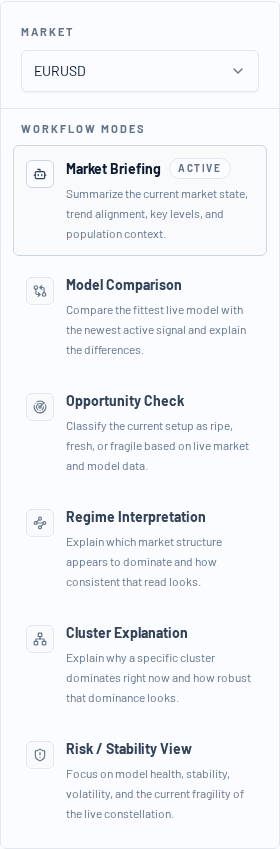
Step 1: Select the market
Start by choosing the symbol you want Charlie to interpret.
Charlie always works against the currently selected market context, so this is the first filter on the analysis.
- Single Symbol plans can only switch within the subscribed market context
- Pro and Pro+ can switch across up to 5 selected Charlie symbols
Step 2: Pick a workflow
Each workflow frames the analysis differently. For example:
- Market Briefing: a broad analyst read on the current market tone
- Regime Interpretation: what structure currently seems dominant
- Opportunity Check: whether the setup looks fresh, mature, or fragile
- Risk / Stability View: where the current configuration looks robust vs. vulnerable
- Model Comparison: how the strongest live model compares with the latest signal
- Cluster Explanation: why a certain model cluster currently dominates
If a workflow is locked on your current plan, it remains visible but marked as unavailable.
Current plan behaviour:
- Single Symbol includes
Market Briefing,Regime Interpretation,Opportunity Check, andRisk / Stability View - Pro unlocks all Charlie workflows and currently includes 3 model comparisons per day
- Pro+ unlocks all workflows with the highest daily usage allowance
Step 3: Read the bottom line first
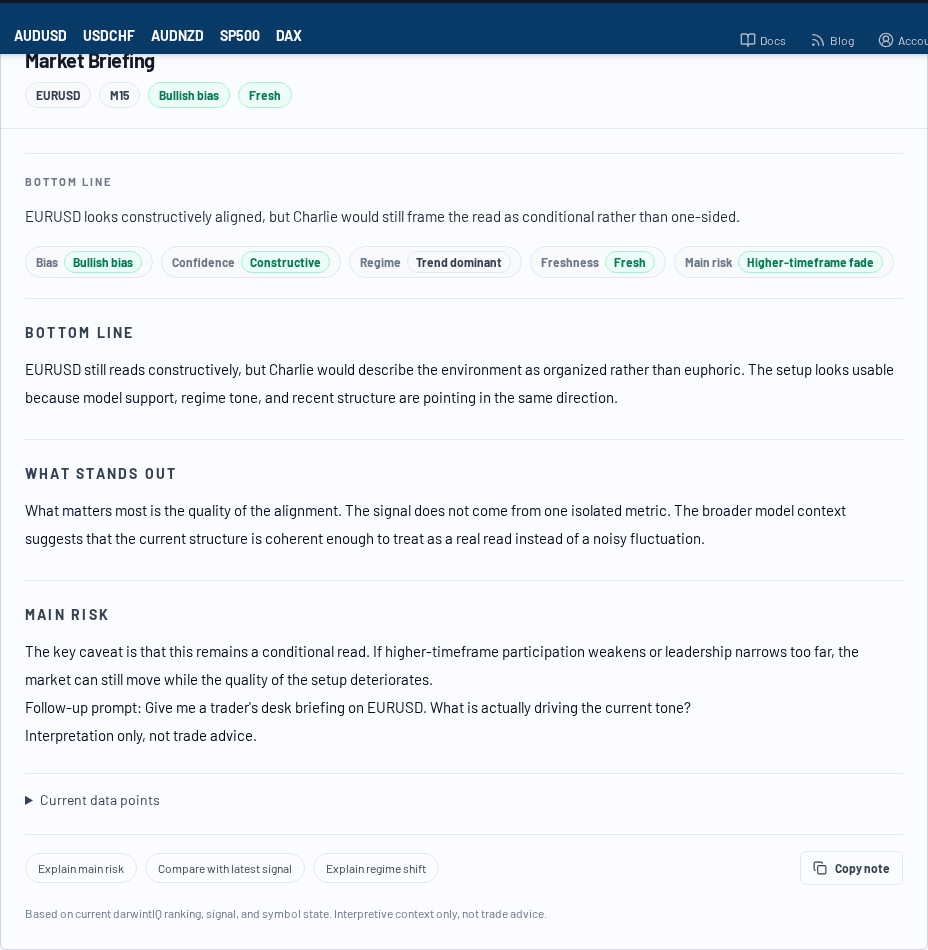
Charlie notes are intentionally structured so you can scan them in layers.
Start with:
- the workflow title
- the Bottom line
- the compact summary tags
- the context line showing symbol, workflow, and analysis freshness
That usually gives you the fastest useful read before you move into the longer interpretation.
Step 4: Use the thread, not isolated prompts
Charlie works best as a continuing interpretation thread.
The thread keeps the current symbol and workflow context until you deliberately switch them, which makes follow-up questions more useful than starting over from scratch.
Typical follow-ups:
- "So the sentiment is still constructive?"
- "What is the main risk to that read?"
- "Compare that with the latest signal."
- "Why does this cluster dominate?"
This lets you drill into the current setup without leaving the existing context.
Practical usage pattern
A simple workflow that works well:
- start with Market Briefing
- move to Regime Interpretation if the structure is unclear
- ask for Risk / Stability View to understand the main fragility
- use Model Comparison if your plan includes comparison access and you want to contrast the current leader with the latest signal
Best practice
Charlie is strongest when you use it to interpret, clarify, and pressure-test what the platform is already showing.
Use Charlie to:
- reduce time-to-understanding
- clarify what the live structure appears to mean
- identify the main caveat in the current market picture
Do not use Charlie as a substitute for execution discipline or independent judgment.