
Trading Model card fields explained
Trading Model card fields explained
Trading Model cards appear in:
- the Symbol Dashboard (
Live Trading Models) - the Favorites page
They are designed for fast comparison, not full deep-dive analysis.
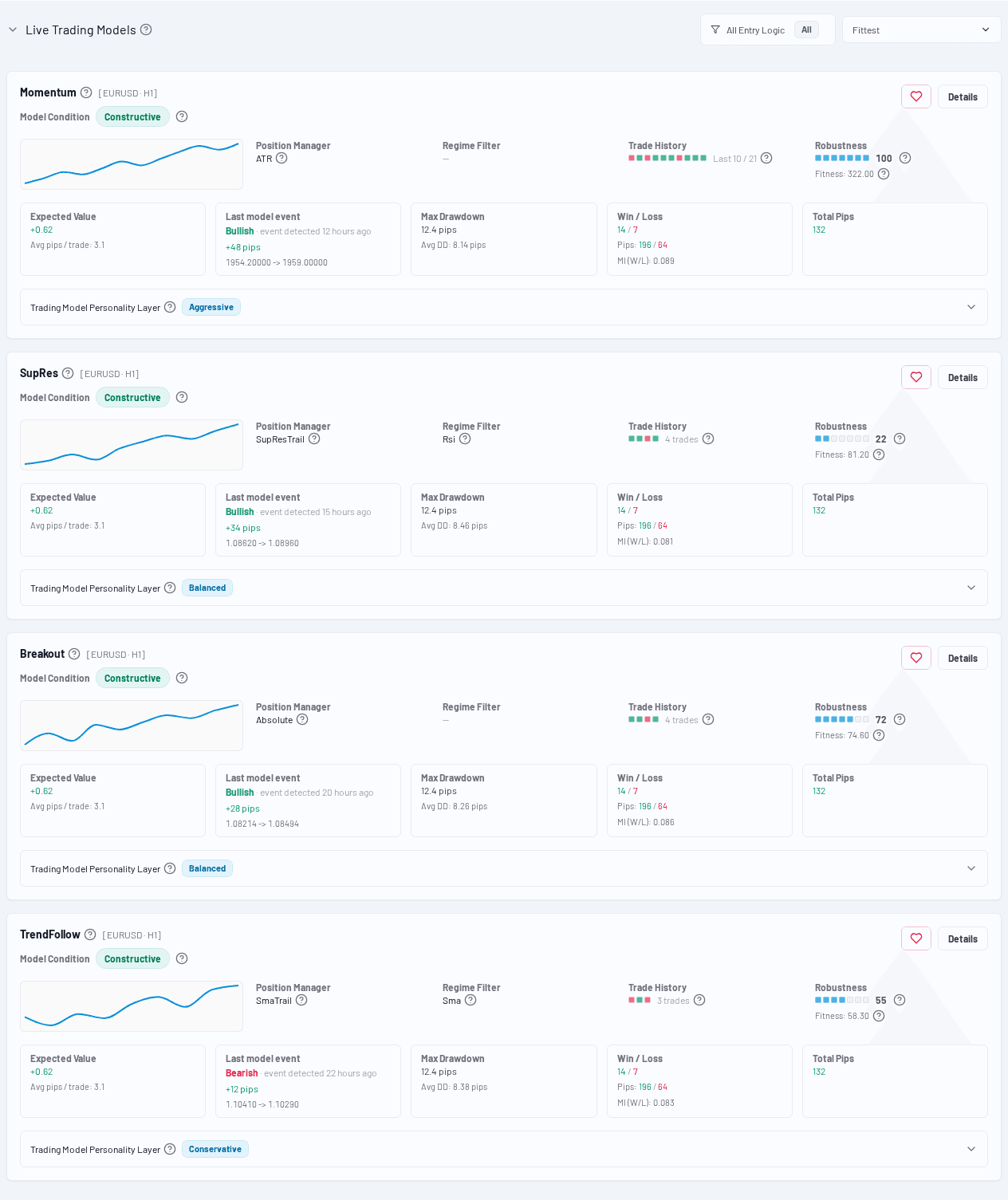
Card header
Entry Logic (name)
The primary signal logic class used by the Trading Model (for example TrendFollow, SupRes, MACD, etc.).
The tooltip on the label shows the model's entry logic description.
Symbol / Timeframe
Shown as [SYMBOL · TF], for example:
[EURUSD · M15][XAUUSD · H1]
Dominant badge
If shown, this card is currently the leading/dominant model in the list context.
Decision / state row
Model Condition
Displays the current state/pill for the model (for example bullish/bearish/neutral style states depending on the model output).
Use this together with the latest event and move-since-entry, not in isolation.
Compact analytics row
Position Manager
The exit/stop logic class (for example ATR, Absolute, SMA trailing, etc.).
Tooltip explains the behavior.
Regime Filter
The condition filter that controls when the model is allowed to trade.
- Typical examples are
SMA,RSI,RsiBand,TrendRegimeFilter, orSupResFilter - A concrete filter class tells you that the model is explicitly gated by market conditions instead of being always eligible
For the individual filter types and what they actually enforce, see Regime Filter types explained.
Trade History bar
A small visual summary of recent trade outcomes (quick distribution signal).
Useful for spotting recent streaks or mixed outcomes without opening details.
Robustness
Shows:
- Robustness / Stability score indicator
- Fitness (raw evolutionary ranking value)
Important distinction:
- Fitness: used internally for model selection/ranking
- Robustness/Stability: quality/stability perspective for the user
KPI strip (common fields)
Expected Value
Estimated pips/trade expectation for the model.
Often paired with:
- Avg pips / trade
Last model event
Shows:
- direction (
Bullish/Bearish) - how long ago the event was detected
Move Since Entry
Current pip move since the last detected model event.
This can help assess whether the move is still developing or already extended.
Drawdown / risk-related values
Cards may surface drawdown and risk-related metrics depending on the card variant/context.
Actions
Details
Opens the full Trader Detail page for deep analysis.
Favorites action (context-dependent)
Depending on page/context you may see:
- add to favorites
- remove from favorites
Recommended usage
Use cards to compare quickly, then open Details for:
- lifecycle
- personality/stability metrics
- balance and price chart overlays
- full trade list